Last updated: 2026-11-07
Data mapping tool: map customer files to your schema
MassImporter is a data mapping tool for SaaS teams that import customer files. When a user uploads a CSV or Excel file, MassImporter matches each column to a field in your template by name and alias. The user reviews every match, and the next file with the same layout maps itself. Mapped rows then go through validation, so only clean data reaches your system.
New to the topic? Read what is data mapping for the basics and examples.
On this page
- How column mapping works
- Field aliases: map the names your customers actually use
- Schema mapping across Excel sheets
- Saved mappings: automated data mapping for repeat files
- Mapping through the API, Mendix and MCP
- From mapping to validation
- How MassImporter compares with other data mapping software
- FAQ
How column mapping works
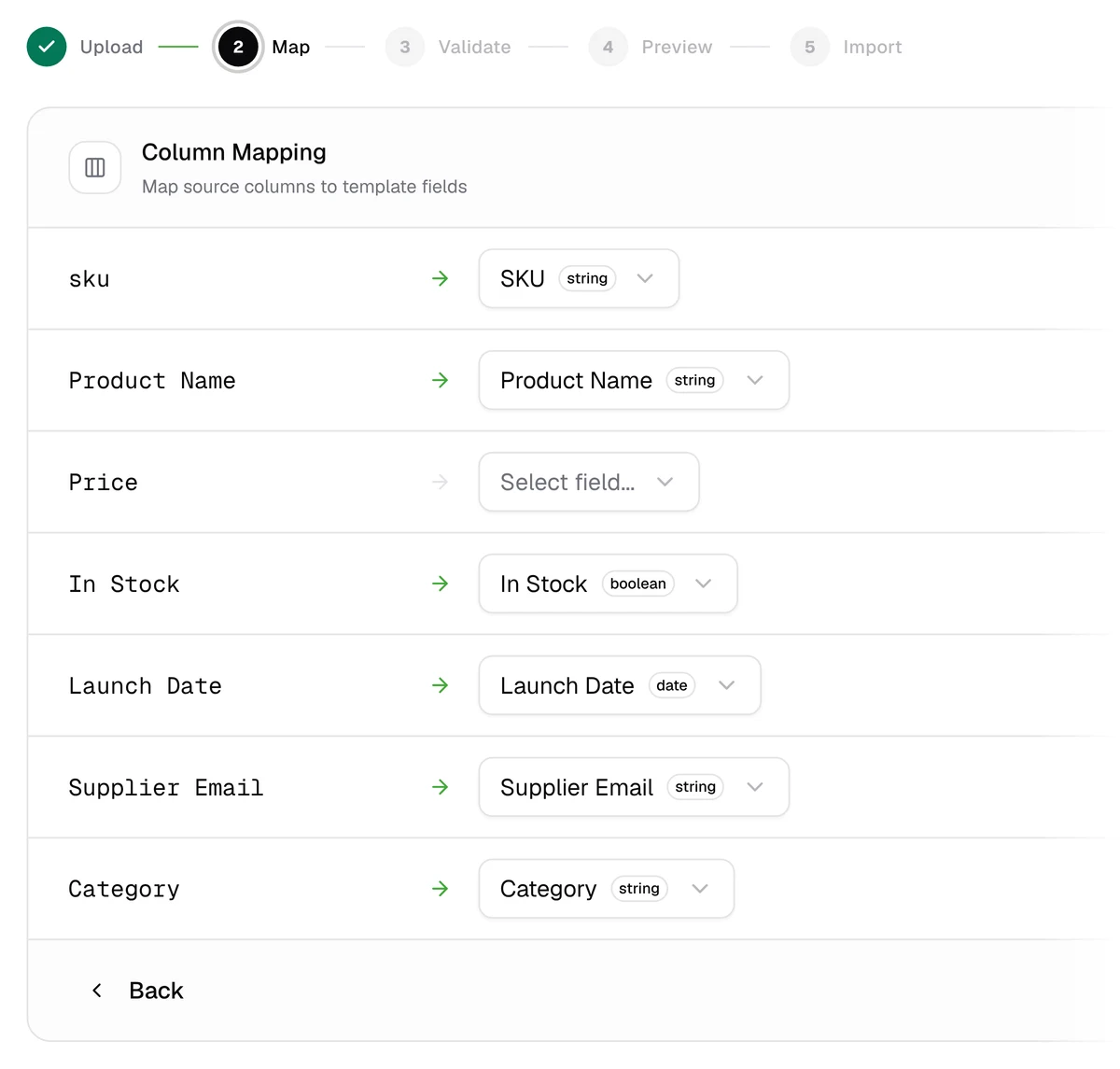
Every import follows the same steps: Upload → Map → Validate → Preview → Import. Mapping is the second step, and it is automatic.
Each column in the file is compared with the fields in your template. Each field has a key (for example sku) and a label (for example "SKU"). A column matches a field when its header is the same as the key or label, ignoring case, spaces, punctuation and accents. So "E-mail", "email" and "EMAIL " all match a field with the key email.
Matching runs in a fixed order, and a field's own name always beats an alias:
- The exact key
- The key or label, ignoring case and surrounding spaces
- The key or label, ignoring case, spaces, punctuation and accents
- The field's aliases
Each column feeds only one field. Fields are checked in template order, and if several columns match one field, the first column in the file wins.
In the dashboard, the user sees every match before anything is validated, and can change or clear any of them. Nothing is imported on a guess.
Field aliases: map the names your customers actually use
Customers rarely use your field names. One sends "Item No.", another "Product Code", a third "Article #". Field mapping by name alone would leave those columns unmatched.
An alias is another header name for a field. Add "Item No." as an alias of sku, and that column matches automatically from then on, with nobody mapping it by hand.
| Customer's column | Alias on field | Maps to |
|---|---|---|
| Item No. | Item No. | sku |
| E-mail Address | E-mail Address | email |
| Qty On Hand | Qty On Hand | stock |
How aliases work:
- A field can have up to 20 aliases, each 1 to 100 characters. You edit them in the Aliases column of the version editor.
- Aliases are compared the same way names are: ignoring case, spaces, punctuation and accents.
- You can edit aliases on a published version. A change applies from the next import, including API imports and retries.
- MassImporter refuses an alias that has no letters or digits, that equals another field's key or label, that another field already uses, or that is "Empty", because that would match a blank Excel column.
Aliases are the main way to make mapping automatic. Each time a customer sends a new header, add it as an alias, and every later file with that header maps without help.
Schema mapping across Excel sheets
Many customer files are whole workbooks, not single tables: customers on one tab, orders on another, products on a third. MassImporter handles schema mapping across all of them in one import.
A template version holds one or more sheets, each with its own fields. When a user uploads an Excel (.xlsx) workbook:
- Each tab goes to the sheet with the same name, or else the same slug, ignoring case.
- Sheets that still have no tab take the remaining tabs in order.
- Any tab left over is not imported.
- Inside each tab, columns map to that sheet's fields as described above.
Example: your template has the sheets Customers and Orders. A customer uploads a workbook with the tabs "customers" and "Orders 2026". "customers" goes to Customers by name, and "Orders 2026" takes the remaining Orders sheet. One upload fills both sheets, and each is validated against its own rules.
A version with more than one sheet accepts only Excel files, because a CSV or Parquet file holds a single table. If a workbook has fewer tabs than the version has sheets, it is still accepted: the unfilled sheets import nothing, and the mapping step says so.
Saved mappings: automated data mapping for repeat files
Most customers send the same file every week or month. MassImporter remembers each mapping you confirm, so a repeat file opens already mapped. You still review it before you continue.
- Per template and sheet. Saved choices belong to one sheet of one template, and they carry over to new versions of that template.
- Per customer. If you import by external ID, each customer gets their own saved mappings. Without an external ID, the template keeps one shared set.
- Exact layouts only. A saved mapping applies when the file has exactly the same column names, in any order, ignoring case, spaces and punctuation. A file with one more or one fewer column counts as a new layout.
- Latest wins. Confirming a mapping replaces the saved one for that layout. Each sheet and scope keeps up to 25 layouts, and the oldest is dropped first.
- Saved choices come before automatic matches. An alias added later doesn't change a saved layout until you click Use automatic matches or delete the saved mapping.
- Only column names are stored, plus the external ID. Saved mappings never store row values.
On the template's page, the Saved column mappings card lists every saved layout. You can delete one or all of them, or turn saving off for that template. Saving is on by default on every plan.
This is how automated data mapping works in MassImporter. Names and aliases handle new files, and saved layouts handle repeat files. Every rule is one you can see and change.
Mapping through the API, Mendix and MCP
Mapping works on every way you can import:
| Surface | How mapping works |
|---|---|
| Dashboard | Automatic matches, saved layouts, and a review step where the user can change any match |
| REST API | Send an explicit mapping. A field you name is never overridden. Columns and fields you leave out fall back to automatic matching. |
| Mendix upload widget | Its own Map step reads column names in the browser, pre-fills matches by key or label, and lets the user change or clear them before upload. Aliases are not applied in the widget yet. |
| MCP (AI agents) | Agents get the automatic match unless they supply a mapping |
See the API reference and the Mendix integration for details.
From mapping to validation
Mapping decides where each value goes. Validation decides whether it can stay. After mapping, every row is checked against the rules on its fields. There are 17 rule types, such as required, unique, min/max, regex, allowed values, email and date range.
Each row stores its values as read, after number, date and true/false conversion, plus any errors. Users can fix invalid rows in the review screen without re-uploading. Clean data then goes to your system through the REST API or HMAC-signed webhooks.
Read more in data validation tools and data cleansing tools.
How MassImporter compares with other data mapping software
"Data mapping software" covers three quite different jobs. Pick the one that matches yours:
| Job | Typical tools | Who maps | Fit for customer file imports |
|---|---|---|---|
| Moving data between databases and warehouses (ETL, integration) | SSIS, Talend, MuleSoft, Boomi, Oracle Integration Cloud | Data engineers, in a visual designer or code | Low: built for pipelines between systems |
| Finding where personal data lives (privacy) | Osano, Ketch, DataGrail | Privacy teams | None: a different meaning of "data map" |
| Importing customer CSV and Excel files into your product | Embeddable importers such as MassImporter | Your customers, with a review step | High |
If your users upload spreadsheets into your app, an ETL tool is too heavy and a privacy tool solves a different problem.
Frequently asked questions
What does a data mapping tool do?
A data mapping tool connects fields in a source to fields in a destination, so each value lands in the right place. In MassImporter, the source is a customer's CSV or Excel file and the destination is your template. Columns are matched by name and alias, and the user reviews each match.
Is data mapping hard?
It gets hard when every customer names columns differently, or when files have many sheets. Aliases and saved layouts cover most of this. You add a new header name once, and every later file with that header maps automatically.
Does MassImporter use AI to map columns?
No. MassImporter matches columns by name and alias, in a fixed, documented order. The result is predictable, and every match can be reviewed and changed before validation.
Can users change the automatic mapping?
Yes. In the dashboard and the Mendix widget, users can change or clear any match before continuing. Through the API you can send an explicit mapping, and fields you name are never overridden.
Does mapping work with Excel files that have several sheets?
Yes. Each tab is matched to a template sheet by name or slug, then columns are mapped inside each tab. One workbook can fill several sheets in a single import.
What is the best way to do data mapping?
Start from a fixed schema (a template), match fields automatically, have a person review the matches, then validate every row before import. For background, read what is data mapping.
Map your first file free. The Free plan includes 100 rows per import and 1,000 rows per month. No credit card needed. Get started →